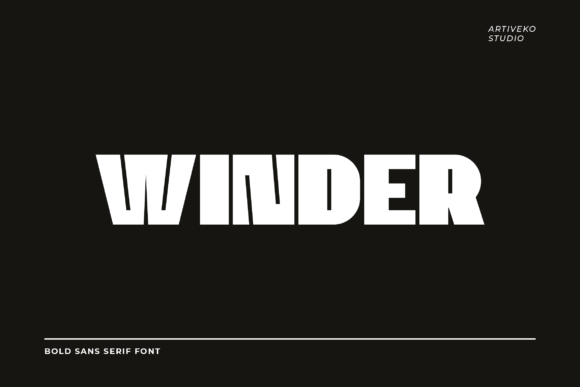
Winder: A Powerful Sans Display Font for Bold Editorial Design
I was sitting at my desk late Tuesday night, staring at a blank InDesign canvas for a client’s new digital coaching workbook. The content was solid—actionable advice, clean layouts, and helpful worksheets—but the typography felt flat. It lacked that immediate sense of authority I wanted readers to feel before they even read the first sentence. That is when I remembered Winder. This powerful sans display font designed to make a bold statement immediately caught my eye. With strong letterforms, sharp lines, and balanced proportions, Winder brings a sense of confidence and authority to any design project that demands attention.
In the world of editorial design, choosing the right typeface is never just about aesthetics; it is about setting the mood for the entire publication. Whether you are redesigning a lifestyle blog header, creating a high-impact newsletter graphic, or structuring a complex ebook, the headline font acts as the anchor. After spending an afternoon testing Winder across various mockups, from a wedding guide layout to a minimalist course PDF, I found it to be a versatile tool for creators who need their text to speak loudly without shouting.
Why Winder Works for Modern Blog Headers and Digital Magazines
The first place I tested Winder was on the hero image of a revamped lifestyle blog. Blog headers are often the most critical real estate on a page because they determine whether a visitor stays or leaves. Traditional serif fonts can sometimes feel too formal or traditional for modern digital-first brands, while generic sans serifs can blend into the background. Winder, however, strikes a perfect middle ground. Its sharp lines and geometric precision give it a contemporary edge that feels fresh yet professional.
When used in a digital magazine layout or a creator newsletter, the font’s strong character ensures that headlines remain legible even at smaller sizes on mobile devices. I noticed that the balanced proportions of the letters prevented the text from feeling cramped, which is a common issue with other display fonts when scaled down. For bloggers and publishers looking to establish a distinct visual identity, using Winder for section headings and pull quotes creates a consistent rhythm throughout the article. It guides the reader’s eye naturally through the content structure, making long-form reading less intimidating and more engaging.
Elevating Ebook Titles and Printable Planners with Strong Letterforms
One of the most lucrative markets for independent designers and authors is the creation of digital products like printable planners, coaching workbooks, and recipe ebooks. These products rely heavily on visual hierarchy to be useful. If a user cannot quickly scan a worksheet or find a specific chapter title, the product loses its value. I applied Winder to a sample recipe ebook cover and an internal chapter opener, and the results were striking.
The font’s ability to carry weight makes it ideal for titles and subtitles where you need to grab attention instantly. On a printable planner, Winder provided a clean, organized look that paired beautifully with simple line art and ample white space. Unlike script fonts or handwritten fonts, which can become difficult to read after prolonged use, Winder maintains clarity. This is crucial for functional design assets where readability is paramount. When designing covers for self-published books or course materials, using a premium font like Winder signals quality to the buyer. It suggests that the content inside has been carefully curated and professionally presented.
Font Pairing Strategies for Editorial Consistency
No display font exists in isolation. To truly leverage the power of Winder, it must be paired correctly with body copy fonts. In my testing, I found that Winder pairs exceptionally well with classic serif fonts for body text. The contrast between the sharp, modern angles of the display font and the organic curves of a traditional serif creates a sophisticated tension that is highly appealing in editorial design.
For example, when laying out a digital magazine feature, I used Winder for the main headlines and pull quotes, while selecting a highly readable serif font for the paragraphs. This combination allows the headlines to pop with authority while ensuring that the actual content remains comfortable to read for extended periods. Alternatively, for a more minimalist aesthetic, such as in a tech-focused newsletter or a modern brand identity kit, pairing Winder with a clean sans serif font works beautifully. The key is to let Winder shine as the star for decorative accents and large-scale text, while relying on simpler typefaces for navigation menus, captions, and dense informational text. This strategic approach to font pairing enhances the overall user experience and reinforces the publication’s brand voice.
Practical Considerations for Commercial Use and Licensing
Before integrating Winder into your next project, it is essential to consider the technical aspects of font licensing and file formats. As a commercial font, understanding the scope of usage is vital for protecting your business. Whether you are embedding the font in a PDF export for an online course, using it in social media graphics for a paid campaign, or printing physical brochures, you must ensure your license covers these activities.
I recommend checking the included styles, alternates, and ligatures before finalizing your design. Some versions of Winder may offer multiple weights, which allows for greater flexibility in creating visual hierarchy without switching typefaces. Additionally, verifying multilingual support is crucial if your audience is global. While Winder is designed to make a bold statement, its effectiveness depends on proper implementation. Avoid using it for small captions or dense paragraphs, as its expressive nature can cause eye strain over time. Instead, reserve it for impactful moments: book covers, website headers, logo design elements, and packaging design. By respecting the font’s strengths and limitations, you can create designs that are not only visually stunning but also functionally effective.
Final Verdict on Using Winder for Bold Statements
In a crowded digital landscape, standing out requires more than just good content; it requires a strong visual presence. Winder delivers exactly that. Its powerful sans display characteristics make it an excellent choice for editors, designers, and creators who want to convey confidence and clarity. Whether you are building a personal brand, launching a new product line, or simply refreshing your blog’s aesthetic, incorporating Winder into your typography stack is a smart move. It bridges the gap between artistic expression and functional design, ensuring that your message is not only seen but felt. For anyone seeking a reliable, high-impact font that elevates their editorial projects, Winder is a worthy investment.