Teach Typeface Review: A Vibrant Display Font for Playful Branding
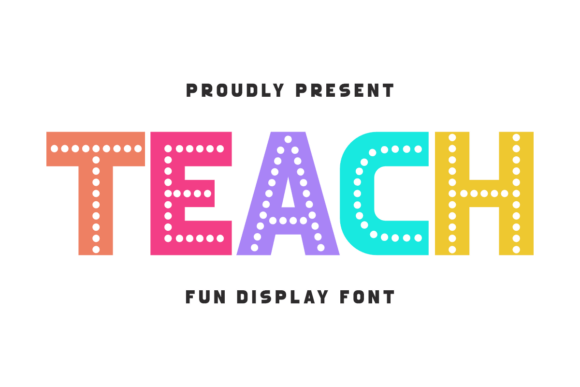
I opened a blank Figma file on a Tuesday afternoon, staring at the cursor blinking in an empty artboard. The brief was simple but deceptively tricky: create a visual identity for a new line of educational stationery that needed to feel joyful without sacrificing professionalism. I had already rejected three serious serif options and two rigid geometric sans serifs. They felt too corporate, too cold for a product meant to spark creativity in young minds. That’s when I dragged Teach into the mix. It wasn’t just another font; it was an immediate shift in mood. As a fun, vibrant, and playful display font designed to bring joy and energy to your back-to-school designs, Teach offered exactly the kind of personality I was struggling to find. With dotted letterforms and cheerful colors, this font is perfect for classroom decor, but its versatility extends far beyond the schoolhouse door.
Why Teach Works as a Primary Display Font for Educational Brands
When you first load Teach, the immediate impression is one of structured whimsy. Unlike many decorative fonts that rely on chaotic shapes or overly complex ligatures, Teach maintains a clean geometric skeleton while injecting character through its unique dot-matrix aesthetic. In my testing, I used it as the primary headline font for a boutique branding project focused on creative workshops for children. The dotted letterforms give the typeface a tactile quality, almost like something you might see on a vintage chalkboard or a perforated ticket stub. This texture adds depth to digital designs without requiring heavy graphic elements.
As a display font, Teach excels in large sizes where its details can breathe. I placed it on a mockup for a workshop poster, and the energy it conveyed was instant. It doesn’t shout; it invites. For brand designers looking to establish a friendly yet organized brand identity, this typeface strikes a balance between approachability and clarity. It avoids the trap of being too childish by maintaining consistent stroke weights and legible proportions, making it suitable for audiences ranging from elementary students to adult learners seeking a creative outlet. When evaluating fonts for educational niches, readability is often compromised for style, but Teach proves that playfulness and function can coexist.
Teach for Packaging Design and Product Labels
One of the most revealing tests for any commercial font is how it performs on physical packaging. I applied Teach to a series of label mockups for a handmade soap brand that targeted parents buying gifts for teachers. The goal was to make the product look premium but fun. Using Teach for the main product name allowed the packaging to stand out on a crowded shelf. The dotted aesthetic mimics the texture of natural ingredients like sea salt or sugar scrubs, creating a subtle visual link between the typography and the product itself.
The font’s ability to hold attention makes it ideal for short phrases on packaging design. However, I found that it works best when paired with a neutral supporting typeface. For the ingredient lists and legal disclaimers, I switched to a clean sans serif font. This contrast created a clear visual hierarchy, ensuring that the brand name remained the focal point while the necessary information remained accessible. If you are designing design assets for e-commerce, using Teach for the hero text on your product pages can significantly increase engagement, as it breaks the monotony of standard Helvetica or Arial defaults. Its vibrant nature translates well to high-resolution prints, retaining its crisp edges even when scaled down for small tags.
Teach in Social Media Graphics and Digital Headers
In the realm of social media graphics, scroll-stopping power is everything. I tested Teach in a series of Instagram posts for a creative studio promoting their summer camps. Because the font is inherently colorful and energetic, it required minimal additional decoration to look complete. I experimented with different color palettes, placing the white dotted letters against deep navy backgrounds and bright yellow accents. The result was a cohesive set of visuals that felt unified yet dynamic.
For web design, specifically in homepage hero sections, Teach serves as an excellent accent font. It draws the eye immediately to the value proposition. However, due to its decorative nature, it should not be used for body text. I noticed that at smaller sizes, the dots could merge, reducing legibility. Therefore, it is best utilized as a headline font or for key call-to-action buttons. When combined with ample whitespace, Teach allows the content to breathe, preventing the design from feeling cluttered. This strategic use ensures that the audience engagement remains high, as users can quickly scan the message without visual fatigue.
Font Pairing Strategies for Modern Typography Systems
No premium font exists in a vacuum, and finding the right partner for Teach is crucial for a polished final look. Since Teach has strong geometric and decorative qualities, it pairs exceptionally well with minimalist sans serif fonts. I recommend using a lightweight, clean sans serif for subheads and body copy to ground the exuberance of Teach. The contrast between the playful dots and the smooth lines of a modern sans serif creates a sophisticated tension that elevates the entire modern typography system.
Alternatively, for projects aiming for a more traditional academic feel, pairing Teach with a classic serif font can yield interesting results. Imagine using Teach for the title "Welcome Back" and a refined serif for the subtitle "Classroom Essentials." This combination bridges the gap between nostalgia and contemporary design. Avoid pairing Teach with other script or handwritten fonts, as the competing decorative elements can clash and reduce overall readability. The key is to let Teach shine as the star while the supporting fonts provide structure and stability.
Practical Considerations for Client Work and Licensing
Before incorporating Teach into any final client deliverables, it is essential to review the included styles and file formats. While the description highlights its vibrancy, checking for multilingual support is vital if your brand operates internationally. Ensure that the diacritical marks render correctly with the dotted aesthetic, as some display fonts struggle with extended Latin characters. Additionally, verify the font licensing terms carefully. Commercial font licensing varies widely, and using a creative font in client work, such as logos, merchandise, or templates, may require specific commercial rights.
I always advise testing the font in grayscale before finalizing a design. Sometimes, the reliance on color can mask structural weaknesses in the letterforms. By viewing Teach in black and white, you can assess whether the dotted patterns still convey the intended energy. If the design feels weak without color, it may be too dependent on the visual gimmick rather than solid typographic fundamentals. Finally, remember that while Teach is perfect for classroom decor and back-to-school themes, its appeal is broad enough for any brand seeking to inject a sense of fun and learning into their visual language. Just ensure you respect the license agreements regarding print-on-demand products and digital downloads to protect your business legally.